Create Department
Introduction
Departments in AIV allow you to organize and segment your application into distinct organizational units. Each department can have its own set of users, data, and access controls, enabling multi-tenancy and better data isolation within a single AIV instance. This is especially useful for managing resources when different teams or clients share the same environment.
This guide walks you through the process of creating a new department using the Universal Auth Administration panel.
Steps to Create a New Department
-
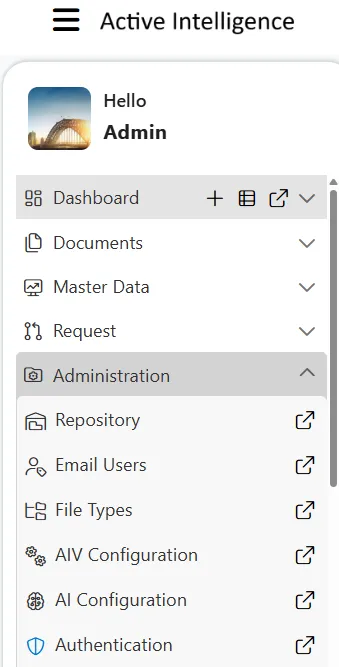
Click on the Hamburger menu (three horizontal lines) in the top left corner of the screen.
-
Navigate to the Administration section and click on Authentication.
-
The Universal Auth Administration page will open. From the left-hand directory menu, select Departments.
-
On the Departments page, click on the Create department button located on the right side.
-
The Create department form will appear. This form creates the department and its first admin user, who will be granted the ADMINISTRATOR role and set as the department owner. Fill in the following details:
- Department code: Enter a unique code for the department (e.g.,
H001). - Department name: Enter a descriptive name for the department (e.g.,
Human Resources). - Status: Ensure this is set to ACTIVE.
- Admin username: Enter a username for the initial admin of this department (e.g.,
hr_admin). - Admin password: Enter a secure password for the admin user (e.g.,
Password123!).
- Department code: Enter a unique code for the department (e.g.,
-
Click on the Create button to save and create the new department.